
Earmaster Review
Last updated: April 2026 • I’ve been using EarMaster on and off for over a year. Here is what I think after putting in real practice hours.
EarMaster — Quick Overview | |
| Best For | Musicians who want structured ear training with real feedback |
| Price | Free tier available • Paid plans for Upgrades |
| Platforms | Desktop (Windows/Mac), iPad, iPhone |
| Skill Level | Complete beginners through advanced players |
| Exercises | 2,000+ across pitch, rhythm, chords, scales, sight-singing |
| Standout Feature | Real-time pitch tracking when you sing into your mic |
| Recognition | App Store Best App of the Month (Jan 2020), NAMM TEC nominee |
My Honest Take After 12+ Months
I will be straight with you. I’ve downloaded 6 or 7 ear training apps over the years. Most of them followed the same pattern: I’d use them for a week, hit a wall where the exercises felt repetitive, and quietly remove them. EarMaster broke that cycle for me, and I want to explain why.
The thing that hooked me wasn’t one killer feature. It was the way everything connected. You’re not just drilling intervals in isolation. One session you’re identifying a minor 7th, the next you’re singing it back, and then you are hearing it show up inside a chord progression. That loop—hear it, name it, sing it, recognize it in context—is what actually builds your ear. Most apps only give you one piece of that.
EarMaster isn’t perfect. I’ll get into what bugs me later. But if you want a single app that covers ear training, sight-singing, rhythm work, and basic theory in one place, this is the strongest option I’ve found. Apple agreed, apparently—they named it App Store Best App of the Month back in January 2020. It’s also been nominated for a NAMM TEC Award and recognized in the Music Teacher Awards for Excellence.
ChiddyChat over at Nashville Music Academy put it well: the app works for both beginners who’ve never trained their ear and advanced players who want to sharpen what they’ve already built. That lines up with my experience.
So, What Exactly Is EarMaster?
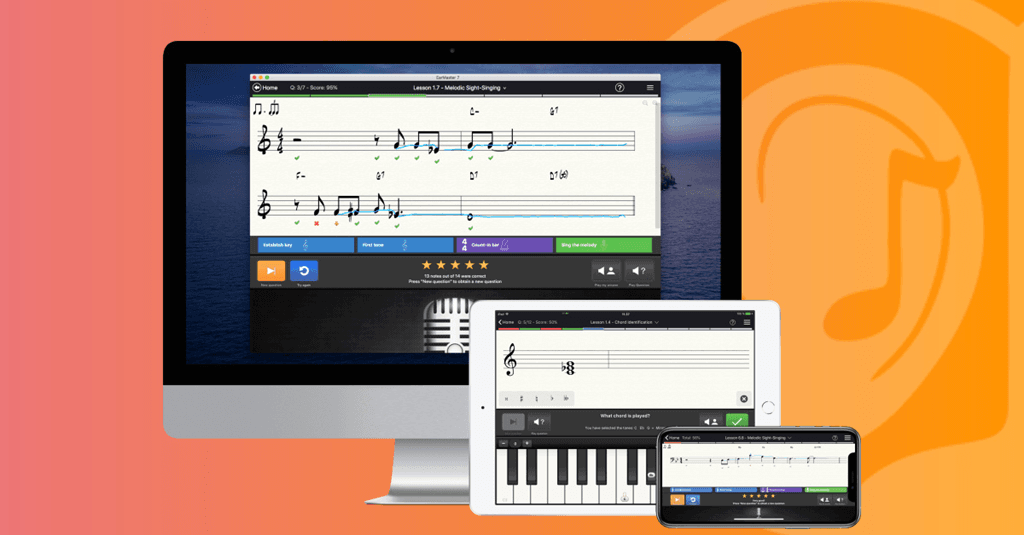
At its core, EarMaster is desktop and mobile software that teaches you to hear, identify, and reproduce musical elements. Intervals, chords, scales, rhythms, melodies—all of it. There are 14 different activity types woven across guided courses and open practice modes.
What separates it from a basic quiz app is the input methods. You don’t just tap multiple choice answers (though you can). You sing into your microphone and get real-time pitch feedback. You clap rhythms. You can plug in a MIDI keyboard and play your answers. That physical engagement makes a huge difference compared to passively tapping buttons.
It runs on Windows, Mac, iPad, and iPhone. If your school or choir uses EarMaster Cloud, your progress syncs between home practice and classroom assignments. There’s also prep material baked in for ABRSM Aural Tests and RCM Voice exams, which is a nice bonus if you’re working toward those.
The Features That Actually Matter
I’m going to skip the marketing bullet points and focus on what you’ll actually notice when you sit down and practice.
Interval Training That Goes Beyond Flashcards
Three modes here: Identification, Comparison, and Singing. Identification plays an interval and you pick what it is—pretty standard. But you choose your answer interface: staff notation, piano keyboard, guitar fretboard, bass, violin, or solfege buttons. Pick whatever matches how you think about music.
Interval Comparison is underrated. You hear two intervals labeled A and B, then decide which one’s larger. Sounds simple, but it trains something different from naming—it builds your sense of relative distance. That skill matters when you’re transcribing or playing by ear and you need fast, gut-level judgments.
Interval Singing is where things get real. The app gives you a reference tone and says something like “Sing the Perfect 5th above D.” You sing into your mic, and EarMaster shows you exactly how close you were. No hiding. This is the exercise that improved my ear the fastest, honestly, because it forced me to produce the sound, not just recognize it.
Chord and Scale Work
Chord Identification lets you pick your instrument interface and customize the drill. Even the free version includes this, which is generous. Inversions training is where it gets harder—and more useful. Hearing a root position C major chord is one thing. Hearing a second inversion C major and knowing that’s what it is? That takes reps, and EarMaster gives you those reps.
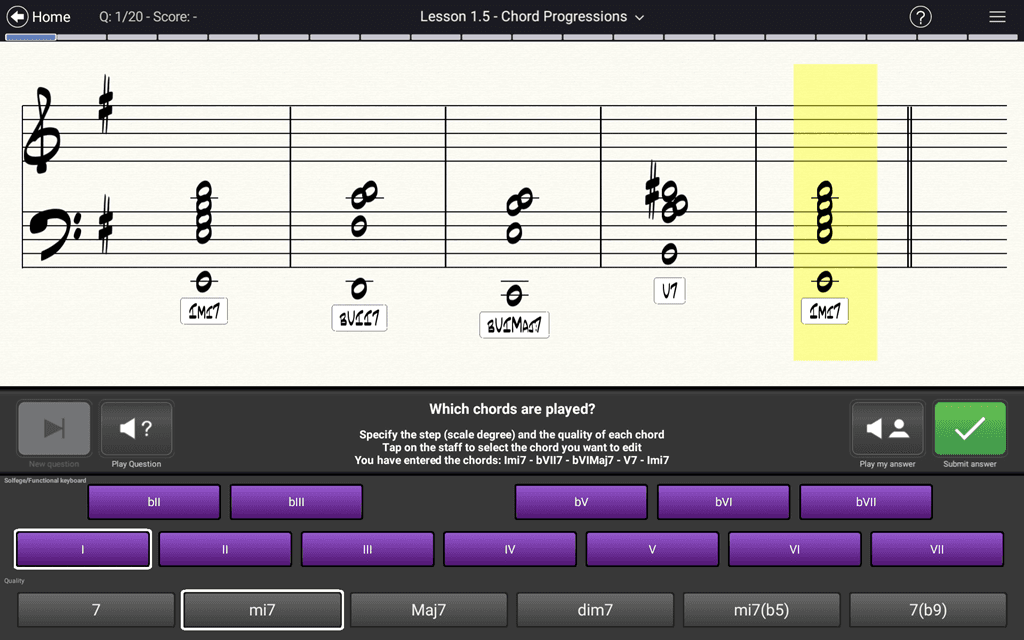
Chord Progressions shift you into functional ear training territory. You’re identifying chords by Roman numeral in relation to the key, not just by name. So instead of “that’s a G major chord,” you’re hearing “that’s the V.” Huge difference for anyone who wants to jam, improvise, or write songs.
Scale Identification rounds it out. The app plays a scale, you name it. Straightforward, but it ties the chord work back to the bigger harmonic picture.
Rhythm Training (Don’t Skip This)
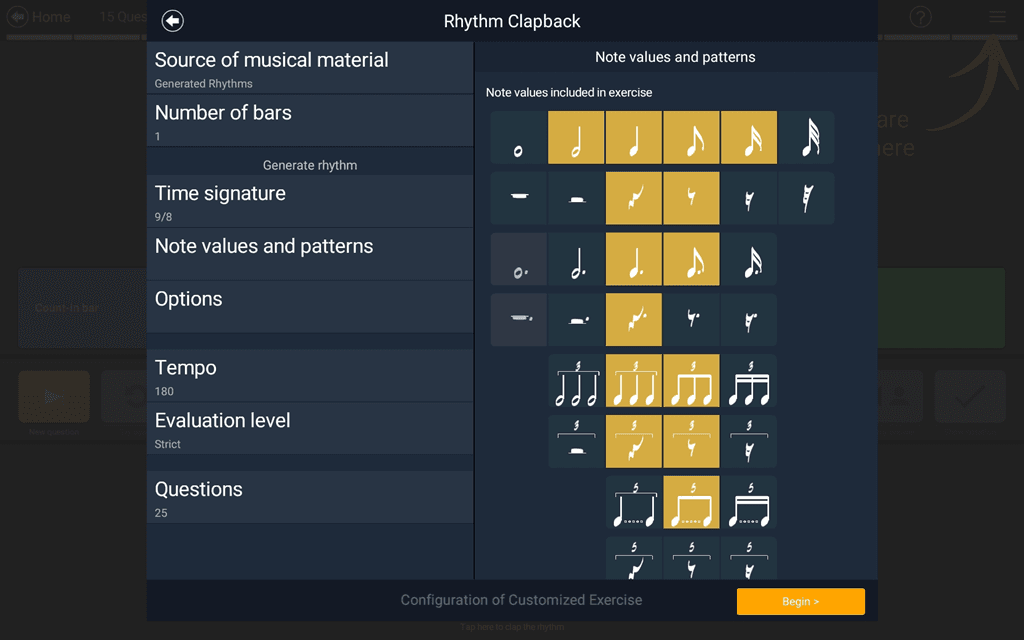
I’ll admit I used to skip rhythm exercises in other apps. EarMaster made me stop doing that because the rhythm modes are actually engaging.
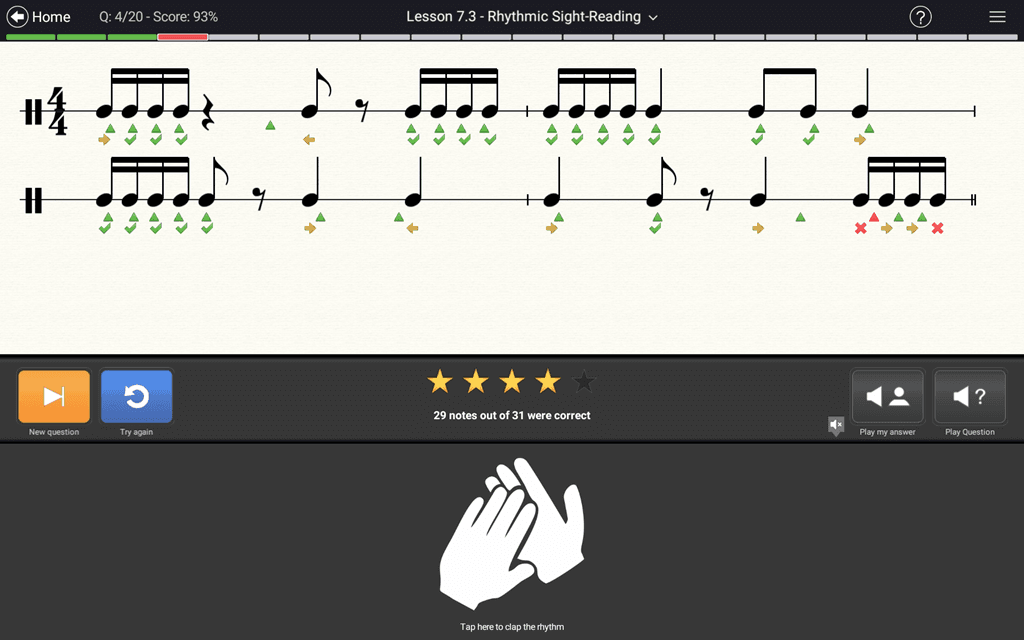
Rhythmic Sight-Reading shows you a rhythm on a staff. You clap it, tap it on your keyboard spacebar, or play it on a MIDI controller while a metronome keeps you honest. You get immediate feedback on where your timing drifted.
Rhythm Clapback is call-and-response. The app plays a rhythm, you echo it back. Simple concept, but it exposes timing weaknesses you didn’t know you had.
Rhythm Error Detection is my favorite rhythm exercise in any app. You see a notated rhythm, hear a slightly different version played back, and mark where the change happened. It’s like being a musical detective. Really sharpens your listening.
Rhythmic Dictation plays a rhythm and you notate it on an empty staff. Hard at first, but the improvement curve is steep if you stick with it.
Melodic Dictation and Sight-Singing
Melodic Dictation plays a phrase and you write it down on the staff. Some lessons give you just the bare melody, others layer in accompaniment or up to four voices. At the advanced end, you can pull from a library of 600+ scores—including 200+ Bach chorales—and transcribe individual voices from pieces with up to eight parts.
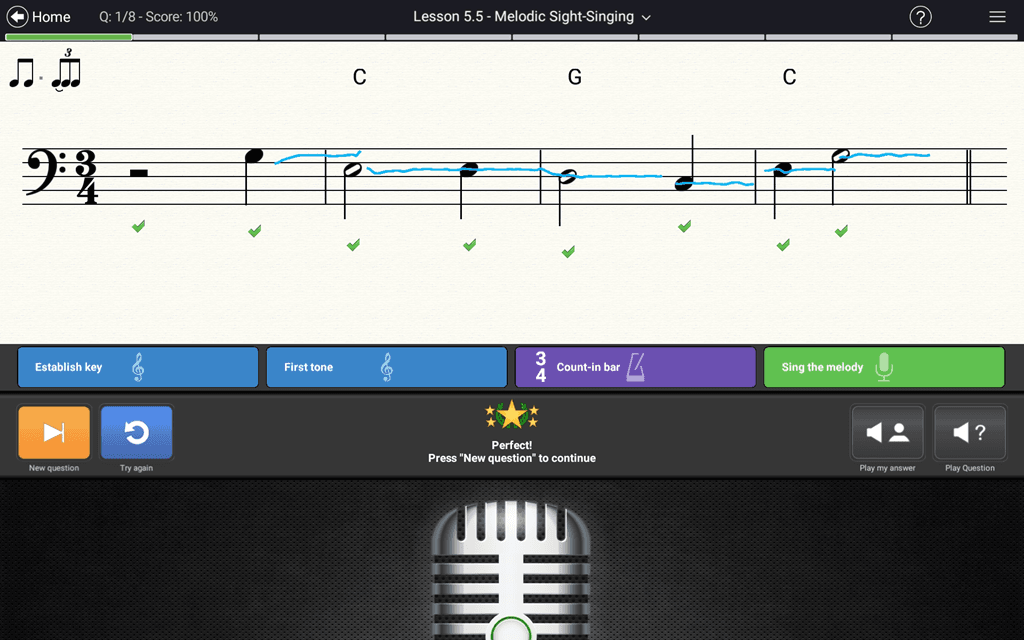
Melodic Sight-Singing flips it around. You see the notation (or solfege syllables) and sing along with a metronome. As you sing, a performance curve overlays the notes showing your pitch and rhythm accuracy in real time. Seeing that visual feedback while you’re singing is genuinely useful. It’s the kind of thing a private voice teacher would do with you, except the app never gets tired.
Melody Singback is the memory drill. Hear a phrase, sing it back. You can use your mic or a MIDI instrument. Short and effective—I usually throw in 5 minutes of this at the end of a session as a cooldown.
Guided Courses and Workshops
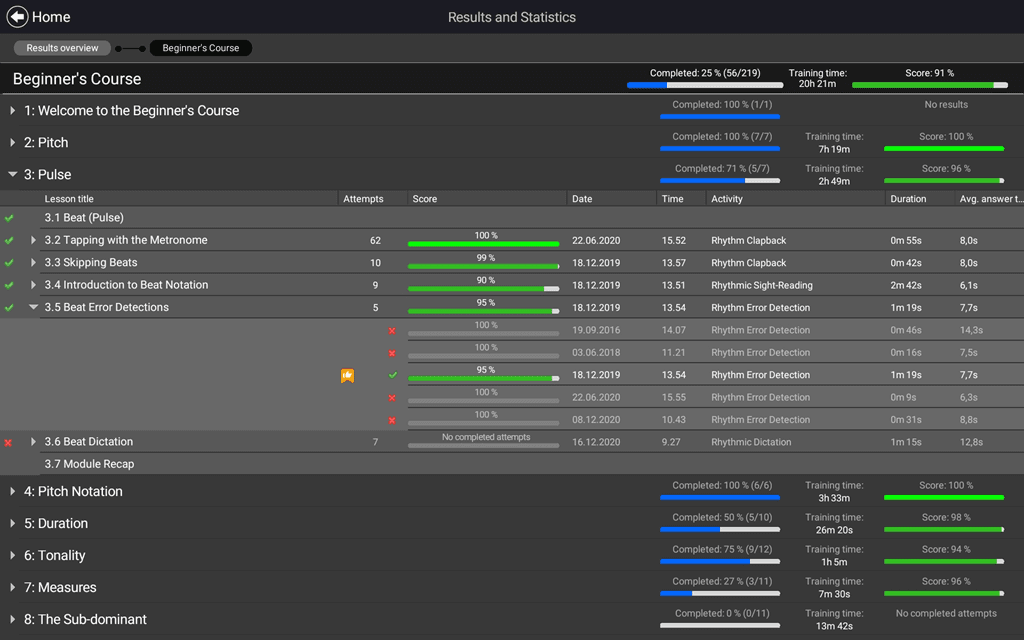
Raw exercises are great, but most people need a path. EarMaster gives you several.
The Beginner’s Course walks you through hundreds of exercises covering rhythm basics, notation reading, intervals, chords, and scales. It starts dead simple—counting beats, recognizing high vs. low—and builds from there. The first 20+ lessons are free, which is enough to see if the teaching style clicks for you.
Solfege Fundamentals teaches movable-do solfege. If that term means nothing to you: it’s a system for singing scale degrees (Do-Re-Mi) that trains your relative pitch. Once it clicks, you start predicting melodies before you fully hear them. Game changer for sight-singing.
The Melodia method is EarMaster’s structured approach to sight-singing. Think of it as a progression that slowly increases your fluency and accuracy, almost like learning a language through graduated reading exercises.
And if you’re past the basics, the Jazz Workshops are a treat. Jazz chords, swing rhythms, extended harmonies—practiced through standards like “After You’ve Gone” and “St. Louis Blues.” I haven’t found another ear training app that goes this deep into jazz.
Customization (This Is Where Power Users Get Hooked)
You can tweak almost everything. Key signatures, pitch ranges, chord voicings, cadence types, time limits, answer interfaces. For melody generation, you control the range, maximum interval leap, and even pin down the first and last notes.
Here’s a tip I figured out after a few months: the algorithmically generated melodies can sound a bit random. Switch to the score library instead. The 600+ real musical excerpts make your practice feel like actual music rather than a math problem. Huge quality-of-life upgrade.
Free Version vs. Paid: What You Actually Get
The free tier is surprisingly usable. You get Interval and Chord Identification exercises with full customization, plus the courses Call of the Notes and Greensleeves, and the first 20+ lessons of the Beginner’s Course.
That’s enough to practice daily for a few weeks before you’d feel limited. Most free music apps give you a glorified demo. EarMaster’s free version is a real practice tool.
When does upgrading make sense? Once you want access to the full course library, advanced workshops, all 14 activity types, and the detailed progress stats. If you’re practicing 3+ times per week and getting serious about improvement, the paid version is worth it. Check Earmaster.com for current pricing on the different tiers.
What I Don’t Love (Being Honest)
The desktop interface looks dated compared to newer apps. It’s functional and clear, but if you’re used to slick mobile-first design, the first impression can be underwhelming. Don’t let that stop you—the actual exercises are well-designed where it counts.
The mobile app is solid on iPad but feels a bit cramped on smaller iPhone screens, especially for notation-heavy exercises. I prefer using it on my laptop or iPad.
Some of the AI-generated melodies in custom mode sound mechanical. I mentioned the score library fix above, but it’d be nice if the default generated content sounded more musical out of the box.
Getting Set Up
Download it from Earmaster.com. Setup takes about two minutes.
For singing exercises, just use your device’s built-in mic. Works fine on laptops, iPads, and iPhones. An external mic is better if you have one, but not necessary.
For rhythm exercises, tap with your spacebar or down arrow key. Fast and no extra gear needed.
If you play keys, plug in a MIDI controller. EarMaster supports MIDI input for sight-reading drills, singback exercises, and instrument-based practice. That’s a nice touch for pianists and keyboardists who want to answer with their instrument instead of clicking buttons.
Bottom Line: Who Should Get EarMaster?
If you’re a musician who knows your ear could be better, and you’ve maybe tried a couple apps that didn’t stick, EarMaster is worth your time.
The combination of structured courses, deep customization, real vocal/rhythm input, and that feedback loop of hear-name-sing-recognize is something I haven’t found matched elsewhere.
It’s especially strong for vocalists and instrumentalists who want to connect what they hear to what they sing or play. And the free version is generous enough that there’s zero risk in trying it.
Start with the free tier. Do the first 20 lessons of the Beginner’s Course. If you’re still opening the app after two weeks, you’ll know upgrading is worth it.
Frequently Asked Questions
Is EarMaster actually free, or is it a limited trial?
The free version isn’t a time-limited trial. You keep access to Interval and Chord Identification, two mini-courses (Call of the Notes and Greensleeves), and 20+ Beginner’s Course lessons indefinitely. Upgrading unlocks the full library.
What devices does EarMaster run on?
Windows and Mac desktops, plus iPad and iPhone. If your school or choir uses EarMaster Cloud, your progress syncs across devices.
Do I need a MIDI keyboard?
Nope. You can answer with your computer keyboard, mouse clicks, or by singing/clapping into your mic. MIDI is optional but nice to have for instrument-based practice.
Can EarMaster help me prepare for music exams?
Yes. There’s built-in prep material for ABRSM Aural Tests (grades 1–5) and RCM Voice exams. It supplements your teacher and official study materials.
Is it good for jazz musicians?
The Jazz Workshops are legitimately useful. They cover jazz chord types, swing rhythms, and extended harmonies using real jazz standards. Not many ear training apps go into jazz territory at all, let alone this deep.
How does the real-time pitch feedback work?
When you sing into your device mic during sight-singing or interval exercises, EarMaster displays a performance curve over the notation. You can see exactly where your pitch was sharp, flat, or on target. Same deal with rhythm—it flags where your timing drifted.
What’s the difference between EarMaster and apps like Perfect Ear or Teoria?
Most competing apps focus on one or two areas (usually interval/chord quizzes). EarMaster covers 14 activity types including sight-singing, dictation, and rhythm work with real microphone input. The customization depth and guided courses are also a step above what most competitors offer.
Where do I download it?
Head to Earmaster.com for the official download. You can also find the mobile version on the App Store. The website has version comparisons and system requirements if you want to double-check compatibility before installing.